How to Put Text Behind Image Objects in 3 Seconds Without Photoshop
Learn how to use our free AI text behind image editor to put text behind image objects in under 3 seconds without Photoshop. Complete step-by-step tutorial.
Add bold, aesthetic text behind people, objects, cars, and models in seconds without Photoshop. Our automated in-browser AI cuts out subjects seamlessly with zero cloud upload—100% private, free, and watermark-free.
Create magazine-grade 3D depth typography in under 10 seconds without needing complex graphic software.
Drop any portrait, product photo, vehicle shot, or wallpaper into the editor. We support PNG, JPG, JPEG, WEBP, GIF, HEIC/HEIF (iPhone), SVG, BMP, TIFF, and AVIF.
Our in-browser machine learning neural network segments the foreground person or object in 1-2 seconds with fine edge fidelity—all computed safely on your device.
Type your headline, choose from curated designer fonts, adjust depth layer order, colors, shadows, and letter spacing, then export crystal-clear PNG/JPG images.
From viral YouTube thumbnails to editorial fashion posters, unlock high-impact visual depth in seconds.
Place dramatic oversized words behind creator portraits and gaming characters to maximize click-through rate.
Design trendy streetwear aesthetics, reels title cards, and aesthetic portrait posts with layered typography.
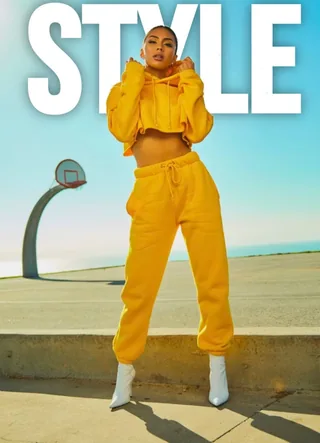
Recreate iconic Vogue, Time, and GQ typography layouts where luxury serif headlines sit naturally behind the model.
Highlight sale discounts, seasonal launches, and brand values behind product photography for immediate conversions.
The Text Behind Image design trend (also known as depth typography or subject-sandwiched text) is an artistic technique where typography is placed on an intermediate layer between an image's background and its foreground subject. Instead of ordinary flat text slapped over a picture, letters naturally disappear behind a model's shoulders, a sports car's roof, or a skyscraper's facade.
Base photograph → Customizable typography layer → Isolated foreground subject cutout. This creates instant optical depth.
Powered by local WebAssembly machine learning. Segments hair, fabric, vehicles, and complex outlines in under 2 seconds.
Your personal photos never leave your device. All rendering is 100% private and executes inside your browser window.
Why spend 20 minutes manually cutting paths in expensive desktop software when AI can do it in seconds?
| Feature | Text Behind Pic (Free AI) | Adobe Photoshop |
|---|---|---|
| Time to Create | ✓ Under 5 Seconds (Instant AI) | ✗ 15 – 25 Minutes (Manual Pen/Lasso) |
| Cost / Pricing | ✓ 100% Free Forever | ✗ $22.99 / Month Subscription |
| Learning Curve | ✓ Zero Experience (1-Click) | ✗ Steep (Requires Masking Skills) |
| Data Privacy | ✓ 100% In-Browser (Never Leaves Device) | ✗ Cloud Sync / Creative Cloud |
| Mobile & Tablet Support | ✓ Full iOS & Android Browser Support | ✗ Desktop Only / Limited Mobile App |
| Export Resolution | ✓ Full 4K Ultra HD (No Watermarks) | ✗ Requires Complex Export Setup |
Follow these graphic design fundamentals to make your text behind image posters look world-class.
For maximum readability, keep at least 70% of each letter visible. Position text so the subject obscures only the center stems or baseline transitions.
Pair bright typography (pure white, neon yellow, electric cyan) against dark backgrounds, or deep obsidian lettering behind sunlit outdoor subjects.
Give your text a subtle blur shadow (blur: 15px, opacity: 40%). This simulates natural real-world lighting and anchors the letters behind the subject.
Heavy geometric display typefaces like Bebas Neue, Montserrat Black, and Outfit create the punchiest silhouette contrast when clipped by human contours.
Everything you need to know about the text-behind-image effect, client-side privacy, and commercial use.
Our AI model automatically detects and separates the main subject (a person, vehicle, product, or landmark) from the photo background. By placing your custom text between the background and the isolated subject layer, the text naturally appears sandwiched behind the subject for a 3D depth effect.
You can put text behind any subject! Our machine learning model recognizes human portraits, cars, motorcycles, pets, sports equipment, architecture, and e-commerce products. If you ever need fine adjustments around complex edges, the built-in manual brush refiner lets you perfect the cutout in seconds.
Yes, 100%! All background separation and image rendering happen entirely inside your web browser using client-side AI processing. Your photos are never uploaded to any cloud server, stored in a database, or shared with third parties.
Absolutely! The text-behind-image depth effect is one of the most effective visual trends for eye-catching YouTube thumbnails, Instagram posts, TikTok covers, magazine headers, and marketing banners.
No! In Adobe Photoshop, creating text behind a photo requires 15 to 20 minutes of manual pen-tool tracing, layer masks, and adjustment layers. Text Behind Pic accomplishes the exact same Hollywood and magazine-grade 3D depth typography in under 5 seconds with zero software installation and zero cost.
It is completely free to use with zero watermarks. You can customize fonts, colors, stroke borders, shadows, and opacity, then download high-resolution PNG or JPG images with full quality.
In the right-hand adjustment panel, simply drag the Opacity slider down (e.g., 60-80%) for an ethereal translucent look. You can also customize X/Y drop shadows, blur radii, and outline stroke borders to make your text pop against any complex or dark background.
Yes! Text Behind Pic is fully responsive and optimized for mobile browsers including Safari for iOS, Chrome for Android, and iPadOS. You can upload photos directly from your phone camera roll, style your typography, and save the finished image directly to your photos.
Yes. Any graphic, thumbnail, album cover, or marketing poster you create with Text Behind Pic is 100% your property. You have full commercial and personal rights to use, monetize, publish, or print your designs with zero royalties or attribution required.
You can click the 'Refine Cutout' button right inside the canvas editor! This launches an interactive manual brush refiner where you can paint to restore missed details or erase unwanted background fragments with ease.
We support PNG, JPG, JPEG, WEBP, GIF, HEIC/HEIF (iPhone photos), SVG, BMP, TIFF, AVIF, and high-resolution camera photos. HEIC photos are automatically converted for instant editing.
Master the text-behind-image depth effect with step-by-step guides written by professional designers.
Learn how to use our free AI text behind image editor to put text behind image objects in under 3 seconds without Photoshop. Complete step-by-step tutorial.
Discover how top creators use 3D text behind image effects, drop shadows, and AI subject cutouts to skyrocket CTR on competitive YouTube feeds.
How our text behind image tool uses in-browser WebAssembly and WebGPU for instant, 100% private local background removal without server uploads.
Master high-end magazine mastheads and poster layouts by seamlessly placing editorial typography and text behind image subjects.
Create viral 9:16 Instagram Story covers and TikTok thumbnails by placing bold aesthetic text behind portrait images and selfies.
Craft underground brutalist fashion posters and cyberpunk lookbooks using oversized neon text behind image models and portraits.